 OneFix Golf
Join the beta
How OneFix Golf measures your swing
What the app does with your video, where its numbers come from and where their limits are.
Body tracking on the phone
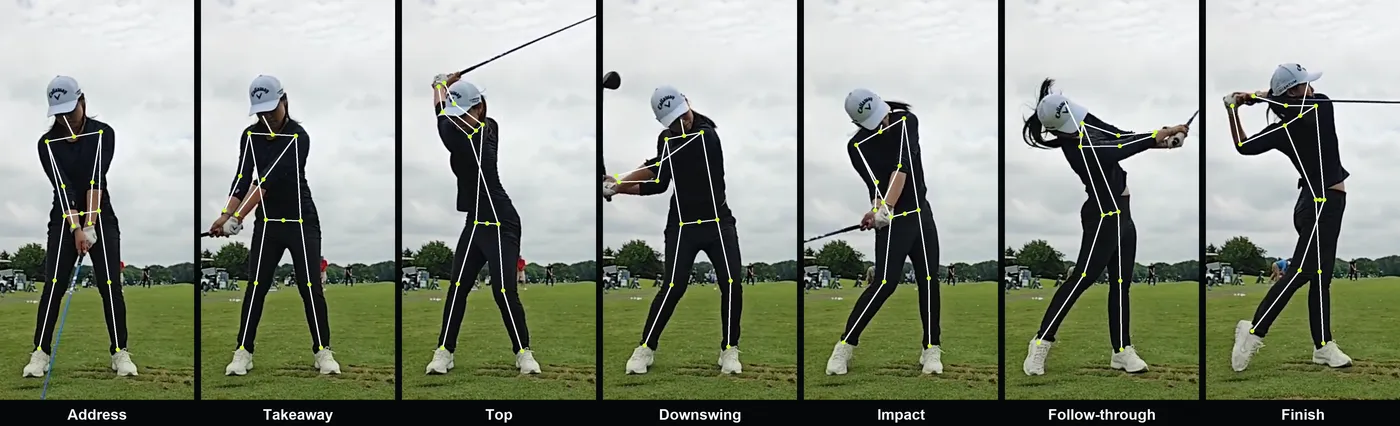
The app runs Apple's Vision body tracking over the video. For every frame it gets nineteen points: head, shoulders, elbows, wrists, hips, knees and ankles. This runs on the iPhone itself.
Points that are briefly hidden, such as a wrist behind the body, are filled in from the frames around them. If somebody walks through the picture, the app keeps following the golfer.
Finding the positions
The seven positions are found from where the hands are, not from how fast they move. The top is where the hands stop rising, impact is where they are lowest on the way down, and address is the last still moment before they move.
That makes the result independent of playback speed. A slow-motion clip from the iPhone camera, which changes speed halfway, gives the same positions as a normal clip. The app then recognises that the clip is slowed down, from how long the downswing appears to take, and converts times back to real time.
From points to numbers
Distances are converted to centimetres using your height, which you set in the app. Angles are measured directly between the points. Each number has a target range based on what is commonly taught and on what is measured in good players, and a score from 0 to 100 for how close you are to it.
The overall swing score is the weighted average of those scores. The three numbers that are furthest from their range, weighted by how much they matter, become your possible fixes.
What is an estimate
A single camera sees a flat picture. Movement across the picture is measured well. Rotation is not seen directly: shoulder turn and hip turn are worked out from how much the shoulder line and the hip line narrow. Those numbers are marked "est." in the app.
Impact is taken from the position of the hands, which is a fraction of a second before the club reaches the ball.
What the app does not measure
- The club face and the ball: no face angle, club head speed or ball flight.
- Pressure under your feet. Weight shift is measured from the position of the hips.
- Rotation from a down-the-line video.
How filming affects the result
The numbers are only as good as the video. The app checks every clip and warns you when your feet or head are out of the picture, when you are too far away or too close, when it lost you during the swing, when the camera was between face-on and down the line, or when there are too few frames in the downswing.
How to use the numbers
Use them to compare your own swings: the same club, the same camera position, before and after a change. That comparison is much more reliable than any single number. It is also what the one fix feature is built on.