 OneFix Golf
Join the beta
The 7 positions of the golf swing, from address to finish
A golf swing takes a little over a second. Nobody can judge it at full speed, so coaches cut it into a handful of fixed positions and look at those.
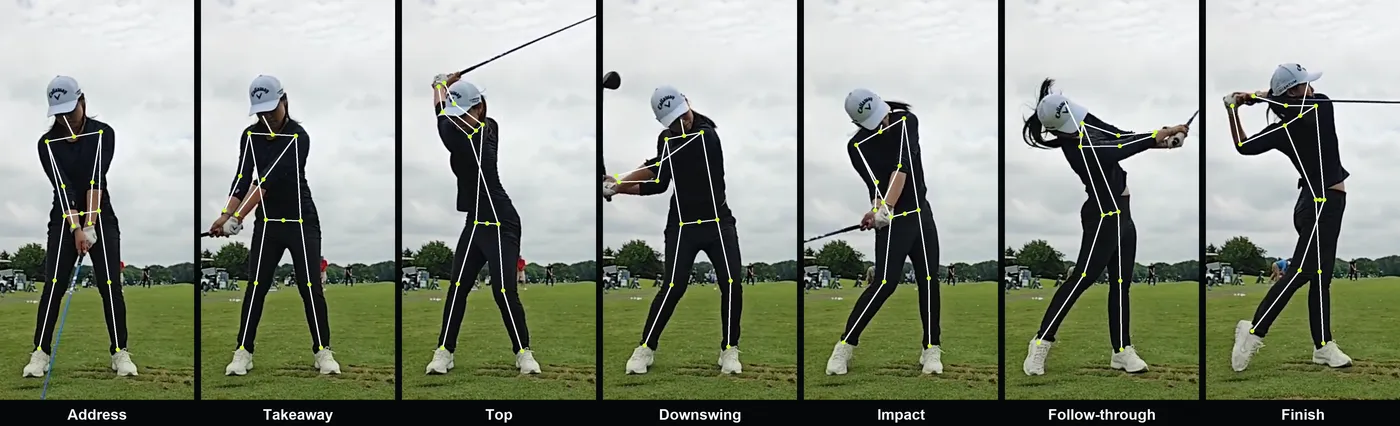
The seven positions of the golf swing are address, takeaway, top, downswing, impact, follow-through and finish. They are fixed checkpoints you can pause a video on, so two swings can be compared at the same moment.
- Film it
- Face-on or down the line
- Aim for
- Seven checkpoints, each with one or two things to look at
Why positions
A position is a moment you can pause on and compare: with a good player, or with your own swing from last week. If two swings look the same at these checkpoints, they are the same swing for most practical purposes.
Some coaches use ten positions and number them P1 to P10. Seven are enough to see what matters, and they are the seven that OneFix Golf marks on the timeline.
The seven positions
- Address. You are set over the ball and still. Check posture, knee flex and how far you stand from the ball.
- Takeaway. The hands have reached hip height on the way back. The lead arm is still straight and the body has started to turn.
- Top. The club changes direction. Check shoulder turn, hip turn, the lead arm and whether the hips have slid away from the target.
- Downswing. The hands are back at chest height on the way down. This is where you see what started the downswing: hips or shoulders.
- Impact. Check that the hips are closer to the target than at address, the head is behind the ball and your posture is still there.
- Follow-through. The hands are at shoulder height after the ball. The arms are long and the chest faces the target.
- Finish. You have stopped. Your weight is on the lead foot and you can hold the pose.
How to find them on video
Most positions are defined by where the hands are, so you can find them by stepping through the video frame by frame. Address is the last still frame before the hands move. The top is the frame where the hands stop rising. Impact is where the hands are lowest on the way down.
OneFix Golf finds all seven from the position of the hands, not from their speed. That is why it also works on slow-motion clips whose speed changes halfway through.
What to do with them
Do not try to fix seven positions. Pick the earliest one that looks wrong. A fault at the top usually explains what you see at impact, and fixing the cause is easier than fixing the result.
Related guides
- Analyse your own swing in 5 stepsFace-on, then down the line
- Swing sequence: what starts downFace-on
- How to film your golf swingBoth
More on swing basics
- Swing tempo and the 3 to 1 ratioFace-on or down the line
- Shoulder turn: how far is enoughFace-on
- Weight shift to the lead sideFace-on
- X-Factor: hips against shouldersFace-on
Updated 16 November 2026. See how the app measures and the glossary.